Friday, 24 August 2018

SEO Negotiation: How to Ace the Business Side of SEO - Whiteboard Friday

Posted by BritneyMuller

SEO isn't all meta tags and content. A huge part of the success you'll see is tied up in the inevitable business negotiations. In this week's Whiteboard Friday, our resident expert Britney Muller walks us through a bevy of smart tips and considerations that will strengthen your SEO negotiation skills, whether you're a seasoned pro or a newbie to the practice.
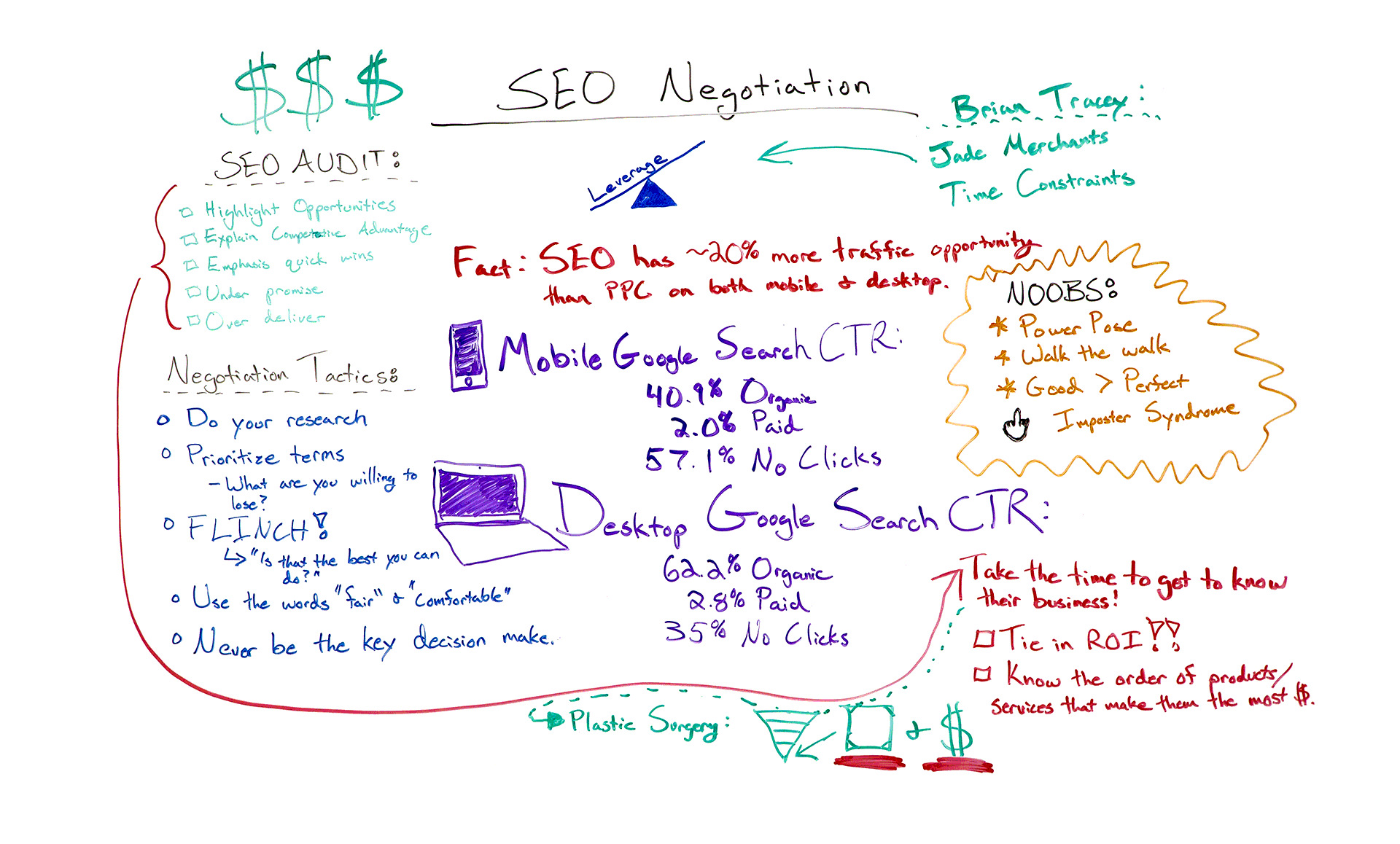
Click on the whiteboard image above to open a high-resolution version in a new tab!

Video Transcription

Hey, Moz fans. Welcome to another edition of Whiteboard Friday. So today we are going over all things SEO negotiation, so starting to get into some of the business side of SEO. As most of you know, negotiation is all about leverage.

It's what you have to offer and what the other side is looking to gain and leveraging that throughout the process. So something that you can go in and confidently talk about as SEOs is the fact that SEO has around 20% more opportunity than both mobile and desktop PPC combined.

This is a really, really big deal. It's something that you can showcase. These are the stats to back it up. We will also link to the research to this down below. Good to kind of have that in your back pocket. Aside from this, you will obviously have your audit. So potential client, you're looking to get this deal.

Get the most out of the SEO audit

☑ Highlight the opportunities, not the screw-ups

You're going to do an audit, and something that I have always suggested is that instead of highlighting the things that the potential client is doing wrong, or screwed up, is to really highlight those opportunities. Start to get them excited about what it is that their site is capable of and that you could help them with. I think that sheds a really positive light and moves you in the right direction.

☑ Explain their competitive advantage

I think this is really interesting in many spaces where you can sort of say, "Okay, your competitors are here, and you're currently here and this is why,"and to show them proof. That makes them feel as though you have a strong understanding of the landscape and can sort of help them get there.

☑ Emphasize quick wins

I almost didn't put this in here because I think quick wins is sort of a sketchy term. Essentially, you really do want to showcase what it is you can do quickly, but you want to...

☑ Under-promise, over-deliver

You don't want to lose trust or credibility with a potential client by overpromising something that you can't deliver. Get off to the right start. Under-promise, over-deliver.

Smart negotiation tactics

☑ Do your research

Know everything you can about this clientPerhaps what deals they've done in the past, what agencies they've worked with. You can get all sorts of knowledge about that before going into negotiation that will really help you.

☑ Prioritize your terms

So all too often, people go into a negotiation thinking me, me, me, me, when really you also need to be thinking about, "Well, what am I willing to lose?What can I give up to reach a point that we can both agree on?" Really important to think about as you go in.

☑ Flinch!

This is a very old, funny negotiation tactic where when the other side counters, you flinch. You do this like flinch, and you go, "Oh, is that the best you can do?" It's super silly. It might be used against you, in which case you can just say, "Nice flinch." But it does tend to help you get better deals.

So take that with a grain of salt. But I look forward to your feedback down below. It's so funny.

☑ Use the words "fair" and "comfortable"

The words "fair" and "comfortable" do really well in negotiations. These words are inarguable. You can't argue with fair. "I want to do what is comfortable for us both. I want us both to reach terms that are fair."

You want to use these terms to put the other side at ease and to also help bridge that gap where you can come out with a win-win situation.

☑ Never be the key decision maker

I see this all too often when people go off on their own, and instantly on their business cards and in their head and email they're the CEO.

They are this. You don't have to be that, and you sort of lose leverage when you are. When I owned my agency for six years, I enjoyed not being CEO. I liked having a board of directors that I could reach out to during a negotiation and not being the sole decision maker. Even if you feel that you are the sole decision maker, I know that there are people that care about you and that are looking out for your business that you could contact as sort of a business mentor, and you could use that in negotiation. You can use that to help you. Something to think about.

Tips for negotiation newbies

So for the newbies, a lot of you are probably like, "I can never go on my own. I can never do these things." I'm from northern Minnesota. I have been super awkward about discussing money my whole life for any sort of business deal. If I could do it, I promise any one of you watching this can do it.

☑ Power pose!

I'm not kidding, promise. Some tips that I learned, when I had my agency, was to power pose before negotiations. So there's a great TED talk on this that we can link to down below. I do this before most of my big speaking gigs, thanks to my gramsy who told me to do this at SMX Advanced like three years ago.

Go ahead and power pose. Feel good. Feel confident. Amp yourself up.

☑ Walk the walk

You've got to when it comes to some of these things and to just feel comfortable in that space.

☑ Good > perfect

Know that good is better than perfect. A lot of us are perfectionists, and we just have to execute good. Trying to be perfect will kill us all.

☑ Screw imposter syndrome

Many of the speakers that I go on different conference circuits with all struggle with this. It's totally normal, but it's good to acknowledge that it's so silly. So to try to take that silly voice out of your head and start to feel good about the things that you are able to offer.

Take inspiration where you can find it

I highly suggest you check out Brian Tracy's old-school negotiation podcasts. He has some old videos. They're so good. But he talks about leverage all the time and has two really great examples that I love so much. One being jade merchants. So these jade merchants that would take out pieces of jade and they would watch people's reactions piece by piece that they brought out.

So they knew what piece interested this person the most, and that would be the higher price. It was brilliant. Then the time constraints is he has an example of people doing business deals in China. When they landed, the Chinese would greet them and say, "Oh, can I see your return flight ticket? I just want to know when you're leaving."

They would not make a deal until that last second. The more you know about some of these leverage tactics, the more you can be aware of them if they were to be used against you or if you were to leverage something like that. Super interesting stuff.

Take the time to get to know their business

☑ Tie in ROI

Lastly, just really take the time to get to know someone's business. It just shows that you care, and you're able to prioritize what it is that you can deliver based on where they make the most money off of the products or services that they offer. That helps you tie in the ROI of the things that you can accomplish.

☑ Know the order of products/services that make them the most money

One real quick example was my previous company. We worked with plastic surgeons, and we really worked hard to understand that funnel of how people decide to get any sort of elective procedure. It came down to two things.

It was before and after photos and price. So we knew that we could optimize for those two things and do very well in their space. So showing that you care, going the extra mile, sort of tying all of these things together, I really hope this helps. I look forward to the feedback down below. I know this was a little bit different Whiteboard Friday, but I thought it would be a fun topic to cover.

So thank you so much for joining me on this edition of Whiteboard Friday. I will see you all soon. Bye.

Video transcription by Speechpad.com


Sign up for The Moz Top 10, a semimonthly mailer updating you on the top ten hottest pieces of SEO news, tips, and rad links uncovered by the Moz team. Think of it as your exclusive digest of stuff you don't have time to hunt down but want to read!

https://ift.tt/2PArD1s

SEO Negotiation: How to Ace the Business Side of SEO - Whiteboard Friday

Posted by BritneyMuller

SEO isn't all meta tags and content. A huge part of the success you'll see is tied up in the inevitable business negotiations. In this week's Whiteboard Friday, our resident expert Britney Muller walks us through a bevy of smart tips and considerations that will strengthen your SEO negotiation skills, whether you're a seasoned pro or a newbie to the practice.

Click on the whiteboard image above to open a high-resolution version in a new tab!

Video Transcription

Hey, Moz fans. Welcome to another edition of Whiteboard Friday. So today we are going over all things SEO negotiation, so starting to get into some of the business side of SEO. As most of you know, negotiation is all about leverage.

It's what you have to offer and what the other side is looking to gain and leveraging that throughout the process. So something that you can go in and confidently talk about as SEOs is the fact that SEO has around 20% more opportunity than both mobile and desktop PPC combined.

This is a really, really big deal. It's something that you can showcase. These are the stats to back it up. We will also link to the research to this down below. Good to kind of have that in your back pocket. Aside from this, you will obviously have your audit. So potential client, you're looking to get this deal.

Get the most out of the SEO audit

☑ Highlight the opportunities, not the screw-ups

You're going to do an audit, and something that I have always suggested is that instead of highlighting the things that the potential client is doing wrong, or screwed up, is to really highlight those opportunities. Start to get them excited about what it is that their site is capable of and that you could help them with. I think that sheds a really positive light and moves you in the right direction.

☑ Explain their competitive advantage

I think this is really interesting in many spaces where you can sort of say, "Okay, your competitors are here, and you're currently here and this is why,"and to show them proof. That makes them feel as though you have a strong understanding of the landscape and can sort of help them get there.

☑ Emphasize quick wins

I almost didn't put this in here because I think quick wins is sort of a sketchy term. Essentially, you really do want to showcase what it is you can do quickly, but you want to...

☑ Under-promise, over-deliver

You don't want to lose trust or credibility with a potential client by overpromising something that you can't deliver. Get off to the right start. Under-promise, over-deliver.

Smart negotiation tactics

☑ Do your research

Know everything you can about this clientPerhaps what deals they've done in the past, what agencies they've worked with. You can get all sorts of knowledge about that before going into negotiation that will really help you.

☑ Prioritize your terms

So all too often, people go into a negotiation thinking me, me, me, me, when really you also need to be thinking about, "Well, what am I willing to lose?What can I give up to reach a point that we can both agree on?" Really important to think about as you go in.

☑ Flinch!

This is a very old, funny negotiation tactic where when the other side counters, you flinch. You do this like flinch, and you go, "Oh, is that the best you can do?" It's super silly. It might be used against you, in which case you can just say, "Nice flinch." But it does tend to help you get better deals.

So take that with a grain of salt. But I look forward to your feedback down below. It's so funny.

☑ Use the words "fair" and "comfortable"

The words "fair" and "comfortable" do really well in negotiations. These words are inarguable. You can't argue with fair. "I want to do what is comfortable for us both. I want us both to reach terms that are fair."

You want to use these terms to put the other side at ease and to also help bridge that gap where you can come out with a win-win situation.

☑ Never be the key decision maker

I see this all too often when people go off on their own, and instantly on their business cards and in their head and email they're the CEO.

They are this. You don't have to be that, and you sort of lose leverage when you are. When I owned my agency for six years, I enjoyed not being CEO. I liked having a board of directors that I could reach out to during a negotiation and not being the sole decision maker. Even if you feel that you are the sole decision maker, I know that there are people that care about you and that are looking out for your business that you could contact as sort of a business mentor, and you could use that in negotiation. You can use that to help you. Something to think about.

Tips for negotiation newbies

So for the newbies, a lot of you are probably like, "I can never go on my own. I can never do these things." I'm from northern Minnesota. I have been super awkward about discussing money my whole life for any sort of business deal. If I could do it, I promise any one of you watching this can do it.

☑ Power pose!

I'm not kidding, promise. Some tips that I learned, when I had my agency, was to power pose before negotiations. So there's a great TED talk on this that we can link to down below. I do this before most of my big speaking gigs, thanks to my gramsy who told me to do this at SMX Advanced like three years ago.

Go ahead and power pose. Feel good. Feel confident. Amp yourself up.

☑ Walk the walk

You've got to when it comes to some of these things and to just feel comfortable in that space.

☑ Good > perfect

Know that good is better than perfect. A lot of us are perfectionists, and we just have to execute good. Trying to be perfect will kill us all.

☑ Screw imposter syndrome

Many of the speakers that I go on different conference circuits with all struggle with this. It's totally normal, but it's good to acknowledge that it's so silly. So to try to take that silly voice out of your head and start to feel good about the things that you are able to offer.

Take inspiration where you can find it

I highly suggest you check out Brian Tracy's old-school negotiation podcasts. He has some old videos. They're so good. But he talks about leverage all the time and has two really great examples that I love so much. One being jade merchants. So these jade merchants that would take out pieces of jade and they would watch people's reactions piece by piece that they brought out.

So they knew what piece interested this person the most, and that would be the higher price. It was brilliant. Then the time constraints is he has an example of people doing business deals in China. When they landed, the Chinese would greet them and say, "Oh, can I see your return flight ticket? I just want to know when you're leaving."

They would not make a deal until that last second. The more you know about some of these leverage tactics, the more you can be aware of them if they were to be used against you or if you were to leverage something like that. Super interesting stuff.

Take the time to get to know their business

☑ Tie in ROI

Lastly, just really take the time to get to know someone's business. It just shows that you care, and you're able to prioritize what it is that you can deliver based on where they make the most money off of the products or services that they offer. That helps you tie in the ROI of the things that you can accomplish.

☑ Know the order of products/services that make them the most money

One real quick example was my previous company. We worked with plastic surgeons, and we really worked hard to understand that funnel of how people decide to get any sort of elective procedure. It came down to two things.

It was before and after photos and price. So we knew that we could optimize for those two things and do very well in their space. So showing that you care, going the extra mile, sort of tying all of these things together, I really hope this helps. I look forward to the feedback down below. I know this was a little bit different Whiteboard Friday, but I thought it would be a fun topic to cover.

So thank you so much for joining me on this edition of Whiteboard Friday. I will see you all soon. Bye.

Video transcription by Speechpad.com


Sign up for The Moz Top 10, a semimonthly mailer updating you on the top ten hottest pieces of SEO news, tips, and rad links uncovered by the Moz team. Think of it as your exclusive digest of stuff you don't have time to hunt down but want to read!

Tuesday, 21 August 2018

NEW On-Demand Crawl: Quick Insights for Sales, Prospecting, & Competitive Analysis

Posted by Dr-Pete

In June of 2017, Moz launched our entirely rebuilt Site Crawl, helping you dive deep into crawl issues and technical SEO problems, fix those issues in your Moz Pro Campaigns (tracked websites), and monitor weekly for new issues. Many times, though, you need quick insights outside of a Campaign context, whether you're analyzing a prospect site before a sales call or trying to assess the competition.

For years, Moz had a lab tool called Crawl Test. The bad news is that Crawl Test never made it to prime-time and suffered from some neglect. The good news is that I'm happy to announce the full launch (as of August 2018) of On-Demand Crawl, an entirely new crawl tool built on the engine that powers Site Crawl, but with a UI designed around quick insights for prospecting and competitive analysis.

While you don’t need a Campaign to run a crawl, you do need to be logged into your Moz Pro subscription. If you don’t have a subscription, you can sign-up for a free trial and give it a whirl.

How can you put On-Demand Crawl to work? Let's walk through a short example together.


All you need is a domain

Getting started is easy. From the "Moz Pro" menu, find "On-Demand Crawl" under "Research Tools":

Just enter a root domain or subdomain in the box at the top and click the blue button to kick off a crawl. While I don't want to pick on anyone, I've decided to use a real site. Our recent analysis of the August 1st Google update identified some sites that were hit hard, and I've picked one (lilluna.com) from that list.

Please note that Moz is not affiliated with Lil' Luna in any way. For the most part, it seems to be a decent site with reasonably good content. Let's pretend, just for this post, that you're looking to help this site out and determine if they'd be a good fit for your SEO services. You've got a call scheduled and need to spot-check for any major problems so that you can go into that call as informed as possible.

On-Demand Crawls aren't instantaneous (crawling is a big job), but they'll generally finish between a few minutes and an hour. We know these are time-sensitive situations. You'll soon receive an email that looks like this:

The email includes the number of URLs crawled (On-Demand will currently crawl up to 3,000 URLs), the total issues found, and a summary table of crawl issues by category. Click on the [View Report] link to dive into the full crawl data.


Assess critical issues quickly

We've designed On-Demand Crawl to assist your own human intelligence. You'll see some basic stats at the top, but then immediately move into a graph of your top issues by count. The graph only displays issues that occur at least once on your site – you can click "See More" to show all of the issues that On-Demand Crawl tracks (the top two bars have been truncated)...

Issues are also color-coded by category. Some items are warnings, and whether they matter depends a lot on context. Other issues, like "Critcal Errors" (in red) almost always demand attention. So, let's check out those 404 errors. Scroll down and you'll see a list of "Pages Crawled" with filters. You're going to select "4xx" in the "Status Codes" dropdown...

You can then pretty easily spot-check these URLs and find out that they do, in fact, seem to be returning 404 errors. Some appear to be legitimate content that has either internal or external links (or both). So, within a few minutes, you've already found something useful.

Let's look at those yellow "Meta Noindex" errors next. This is a tricky one, because you can't easily determine intent. An intentional Meta Noindex may be fine. An unintentional one (or hundreds of unintentional ones) could be blocking crawlers and causing serious harm. Here, you'll filter by issue type...

Like the top graph, issues appear in order of prevalence. You can also filter by all pages that have issues (any issues) or pages that have no issues. Here's a sample of what you get back (the full table also includes status code, issue count, and an option to view all issues)...

Notice the "?s=" common to all of these URLs. Clicking on a few, you can see that these are internal search pages. These URLs have no particular SEO value, and the Meta Noindex is likely intentional. Good technical SEO is also about avoiding false alarms because you lack internal knowledge of a site. On-Demand Crawl helps you semi-automate and summarize insights to put your human intelligence to work quickly.


Dive deeper with exports

Let's go back to those 404s. Ideally, you'd like to know where those URLs are showing up. We can't fit everything into one screen, but if you scroll up to the "All Issues" graph you'll see an "Export CSV" option...

The export will honor any filters set in the page list, so let's re-apply that "4xx" filter and pull the data. Your export should download almost immediately. The full export contains a wealth of information, but I've zeroed in on just what's critical for this particular case...

Now, you know not only what pages are missing, but exactly where they link from internally, and can easily pass along suggested fixes to the customer or prospect. Some of these turn out to be link-heavy pages that could probably benefit from some clean-up or updating (if newer recipes are a good fit).

Let's try another one. You've got 8 duplicate content errors. Potentially thin content could fit theories about the August 1st update, so this is worth digging into. If you filter by "Duplicate Content" issues, you'll see the following message...

The 8 duplicate issues actually represent 18 pages, and the table returns all 18 affected pages. In some cases, the duplicates will be obvious from the title and/or URL, but in this case there's a bit of mystery, so let's pull that export file. In this case, there's a column called "Duplicate Content Group," and sorting by it reveals something like the following (there's a lot more data in the original export file)...

I've renamed "Duplicate Content Group" to just "Group" and included the word count ("Words"), which could be useful for verifying true duplicates. Look at group #7 – it turns out that these "Weekly Menu Plan" pages are very image heavy and have a common block of text before any unique text. While not 100% duplicated, these otherwise valuable pages could easily look like thin content to Google and represent a broader problem.


Real insights in real-time

Not counting the time spent writing the blog post, running this crawl and diving in took less than an hour, and even that small amount of time spent uncovered more potential issues than what I could cover in this post. In less than an hour, you can walk into a client meeting or sales call with in-depth knowledge of any domain.

Keep in mind that many of these features also exist in our Site Crawl tool. If you're looking for long-term, campaign insights, use Site Crawl (if you just need to update your data, use our "Recrawl" feature). If you're looking for quick, one-time insights, check out On-Demand Crawl. Standard Pro users currently get 5 On-Demand Crawls per month (with limits increasing at higher tiers).

Your On-Demand Crawls are currently stored for 90 days. When you re-enter the feature, you'll see a table of all of your recent crawls (the image below has been truncated):

Click on any row to go back to see the crawl data for that domain. If you get the sale and decide to move forward, congratulations! You can port that domain directly into a Moz campaign.

We hope you'll try On-Demand Crawl out and let us know what you think. We'd love to hear your case studies, whether it's sales, competitive analysis, or just trying to solve the mysteries of a Google update.


Sign up for The Moz Top 10, a semimonthly mailer updating you on the top ten hottest pieces of SEO news, tips, and rad links uncovered by the Moz team. Think of it as your exclusive digest of stuff you don't have time to hunt down but want to read!

NEW On-Demand Crawl: Quick Insights for Sales, Prospecting, & Competitive Analysis

Posted by Dr-Pete

In June of 2017, Moz launched our entirely rebuilt Site Crawl, helping you dive deep into crawl issues and technical SEO problems, fix those issues in your Moz Pro Campaigns (tracked websites), and monitor weekly for new issues. Many times, though, you need quick insights outside of a Campaign context, whether you're analyzing a prospect site before a sales call or trying to assess the competition.

For years, Moz had a lab tool called Crawl Test. The bad news is that Crawl Test never made it to prime-time and suffered from some neglect. The good news is that I'm happy to announce the full launch (as of August 2018) of On-Demand Crawl, an entirely new crawl tool built on the engine that powers Site Crawl, but with a UI designed around quick insights for prospecting and competitive analysis.

While you don’t need a Campaign to run a crawl, you do need to be logged into your Moz Pro subscription. If you don’t have a subscription, you can sign-up for a free trial and give it a whirl.

How can you put On-Demand Crawl to work? Let's walk through a short example together.


All you need is a domain

Getting started is easy. From the "Moz Pro" menu, find "On-Demand Crawl" under "Research Tools":

Just enter a root domain or subdomain in the box at the top and click the blue button to kick off a crawl. While I don't want to pick on anyone, I've decided to use a real site. Our recent analysis of the August 1st Google update identified some sites that were hit hard, and I've picked one (lilluna.com) from that list.

Please note that Moz is not affiliated with Lil' Luna in any way. For the most part, it seems to be a decent site with reasonably good content. Let's pretend, just for this post, that you're looking to help this site out and determine if they'd be a good fit for your SEO services. You've got a call scheduled and need to spot-check for any major problems so that you can go into that call as informed as possible.

On-Demand Crawls aren't instantaneous (crawling is a big job), but they'll generally finish between a few minutes and an hour. We know these are time-sensitive situations. You'll soon receive an email that looks like this:

The email includes the number of URLs crawled (On-Demand will currently crawl up to 3,000 URLs), the total issues found, and a summary table of crawl issues by category. Click on the [View Report] link to dive into the full crawl data.


Assess critical issues quickly

We've designed On-Demand Crawl to assist your own human intelligence. You'll see some basic stats at the top, but then immediately move into a graph of your top issues by count. The graph only displays issues that occur at least once on your site – you can click "See More" to show all of the issues that On-Demand Crawl tracks (the top two bars have been truncated)...

Issues are also color-coded by category. Some items are warnings, and whether they matter depends a lot on context. Other issues, like "Critcal Errors" (in red) almost always demand attention. So, let's check out those 404 errors. Scroll down and you'll see a list of "Pages Crawled" with filters. You're going to select "4xx" in the "Status Codes" dropdown...

You can then pretty easily spot-check these URLs and find out that they do, in fact, seem to be returning 404 errors. Some appear to be legitimate content that has either internal or external links (or both). So, within a few minutes, you've already found something useful.

Let's look at those yellow "Meta Noindex" errors next. This is a tricky one, because you can't easily determine intent. An intentional Meta Noindex may be fine. An unintentional one (or hundreds of unintentional ones) could be blocking crawlers and causing serious harm. Here, you'll filter by issue type...

Like the top graph, issues appear in order of prevalence. You can also filter by all pages that have issues (any issues) or pages that have no issues. Here's a sample of what you get back (the full table also includes status code, issue count, and an option to view all issues)...

Notice the "?s=" common to all of these URLs. Clicking on a few, you can see that these are internal search pages. These URLs have no particular SEO value, and the Meta Noindex is likely intentional. Good technical SEO is also about avoiding false alarms because you lack internal knowledge of a site. On-Demand Crawl helps you semi-automate and summarize insights to put your human intelligence to work quickly.


Dive deeper with exports

Let's go back to those 404s. Ideally, you'd like to know where those URLs are showing up. We can't fit everything into one screen, but if you scroll up to the "All Issues" graph you'll see an "Export CSV" option...

The export will honor any filters set in the page list, so let's re-apply that "4xx" filter and pull the data. Your export should download almost immediately. The full export contains a wealth of information, but I've zeroed in on just what's critical for this particular case...

Now, you know not only what pages are missing, but exactly where they link from internally, and can easily pass along suggested fixes to the customer or prospect. Some of these turn out to be link-heavy pages that could probably benefit from some clean-up or updating (if newer recipes are a good fit).

Let's try another one. You've got 8 duplicate content errors. Potentially thin content could fit theories about the August 1st update, so this is worth digging into. If you filter by "Duplicate Content" issues, you'll see the following message...

The 8 duplicate issues actually represent 18 pages, and the table returns all 18 affected pages. In some cases, the duplicates will be obvious from the title and/or URL, but in this case there's a bit of mystery, so let's pull that export file. In this case, there's a column called "Duplicate Content Group," and sorting by it reveals something like the following (there's a lot more data in the original export file)...

I've renamed "Duplicate Content Group" to just "Group" and included the word count ("Words"), which could be useful for verifying true duplicates. Look at group #7 – it turns out that these "Weekly Menu Plan" pages are very image heavy and have a common block of text before any unique text. While not 100% duplicated, these otherwise valuable pages could easily look like thin content to Google and represent a broader problem.


Real insights in real-time

Not counting the time spent writing the blog post, running this crawl and diving in took less than an hour, and even that small amount of time spent uncovered more potential issues than what I could cover in this post. In less than an hour, you can walk into a client meeting or sales call with in-depth knowledge of any domain.

Keep in mind that many of these features also exist in our Site Crawl tool. If you're looking for long-term, campaign insights, use Site Crawl (if you just need to update your data, use our "Recrawl" feature). If you're looking for quick, one-time insights, check out On-Demand Crawl. Standard Pro users currently get 5 On-Demand Crawls per month (with limits increasing at higher tiers).

Your On-Demand Crawls are currently stored for 90 days. When you re-enter the feature, you'll see a table of all of your recent crawls (the image below has been truncated):

Click on any row to go back to see the crawl data for that domain. If you get the sale and decide to move forward, congratulations! You can port that domain directly into a Moz campaign.

We hope you'll try On-Demand Crawl out and let us know what you think. We'd love to hear your case studies, whether it's sales, competitive analysis, or just trying to solve the mysteries of a Google update.


Sign up for The Moz Top 10, a semimonthly mailer updating you on the top ten hottest pieces of SEO news, tips, and rad links uncovered by the Moz team. Think of it as your exclusive digest of stuff you don't have time to hunt down but want to read!

https://ift.tt/2nVZGF2

Friday, 17 August 2018

Do You Need Local Pages? - Whiteboard Friday

Posted by Tom.Capper

Does it make sense for you to create local-specific pages on your website? Regardless of whether you own or market a local business, it may make sense to compete for space in the organic SERPs using local pages. Please give a warm welcome to our friend Tom Capper as he shares a 4-point process for determining whether local pages are something you should explore in this week's Whiteboard Friday!

Click on the whiteboard image above to open a high-resolution version in a new tab!

Video Transcription

Hello, Moz fans. Welcome to another Whiteboard Friday. I'm Tom Capper. I'm a consultant at Distilled, and today I'm going to be talking to you about whether you need local pages. Just to be clear right off the bat what I'm talking about, I'm not talking about local rankings as we normally think of them, the local map pack results that you see in search results, the Google Maps rankings, that kind of thing.

A 4-step process to deciding whether you need local pages

I'm talking about conventional, 10 blue links rankings but for local pages, and by local pages I mean pages from a national or international business that are location-specific. What are some examples of that? Maybe on Indeed.com they would have a page for jobs in Seattle. Indeed doesn't have a bricks-and-mortar premises in Seattle, but they do have a page that is about jobs in Seattle.

You might get a similar thing with flower delivery. You might get a similar thing with used cars, all sorts of different verticals. I think it can actually be quite a broadly applicable tactic. There's a four-step process I'm going to outline for you. The first step is actually not on the board. It's just doing some keyword research.

1. Know (or discover) your key transactional terms

I haven't done much on that here because hopefully you've already done that. You already know what your key transactional terms are. Because whatever happens you don't want to end up developing location pages for too many different keyword types because it's gong to bloat your site, you probably just need to pick one or two key transactional terms that you're going to make up the local variants of. For this purpose, I'm going to talk through an SEO job board as an example.

2. Categorize your keywords as implicit, explicit, or near me and log their search volumes

We might have "SEO jobs" as our core head term. We then want to figure out what the implicit, explicit, and near me versions of that keyword are and what the different volumes are. In this case, the implicit version is probably just "SEO jobs." If you search for "SEO jobs" now, like if you open a new tab in your browser, you're probably going to find that a lot of local orientated results appear because that is an implicitly local term and actually an awful lot of terms are using local data to affect rankings now, which does affect how you should consider your rank tracking, but we'll get on to that later.

SEO jobs, maybe SEO vacancies, that kind of thing, those are all going to be going into your implicitly local terms bucket. The next bucket is your explicitly local terms. That's going to be things like SEO jobs in Seattle, SEO jobs in London, and so on. You're never going to get a complete coverage of different locations. Try to keep it simple.

You're just trying to get a rough idea here. Lastly you've got your near me or nearby terms, and it turns out that for SEO jobs not many people search SEO jobs near me or SEO jobs nearby. This is also going to vary a lot by vertical. I would imagine that if you're in food delivery or something like that, then that would be huge.

3. Examine the SERPs to see whether local-specific pages are ranking

Now we've categorized our keywords. We want to figure out what kind of results are going to do well for what kind of keywords, because obviously if local pages is the answer, then we might want to build some.

In this case, I'm looking at the SERP for "SEO jobs." This is imaginary. The rankings don't really look like this. But we've got SEO jobs in Seattle from Indeed. That's an example of a local page, because this is a national business with a location-specific page. Then we've got SEO jobs Glassdoor. That's a national page, because in this case they're not putting anything on this page that makes it location specific.

Then we've got SEO jobs Seattle Times. That's a local business. The Seattle Times only operates in Seattle. It probably has a bricks-and-mortar location. If you're going to be pulling a lot of data of this type, maybe from stats or something like that, obviously tracking from the locations that you're mentioning, where you are mentioning locations, then you're probably going to want to categorize these at scale rather than going through one at a time.

I've drawn up a little flowchart here that you could encapsulate in a Excel formula or something like that. If the location is mentioned in the URL and in the domain, then we know we've got a local business. Most of the time it's just a rule of thumb. If the location is mentioned in the URL but not mentioned in the domain, then we know we've got a local page and so on.

4. Compare & decide where to focus your efforts

You can just sort of categorize at scale all the different result types that we've got. Then we can start to fill out a chart like this using the rankings. What I'd recommend doing is finding a click-through rate curve that you are happy to use. You could go to somewhere like AdvancedWebRanking.com, download some example click-through rate curves.

Again, this doesn't have to be super precise. We're looking to get a proportionate directional indication of what would be useful here. I've got Implicit, Explicit, and Near Me keyword groups. I've got Local Business, Local Page, and National Page result types. Then I'm just figuring out what the visibility share of all these types is. In my particular example, it turns out that for explicit terms, it could be worth building some local pages.

That's all. I'd love to hear your thoughts in the comments. Thanks.

Video transcription by Speechpad.com


Sign up for The Moz Top 10, a semimonthly mailer updating you on the top ten hottest pieces of SEO news, tips, and rad links uncovered by the Moz team. Think of it as your exclusive digest of stuff you don't have time to hunt down but want to read!

https://ift.tt/2MUjlA7